Getting Started with Okteto
This quickstart takes a sample application and creates an application environment for it in your Kubernetes cluster. All you need to build, deploy, and test the application is the Okteto CLI.
An application environment is a running copy of an application in its own Namespace, with its services and its dependencies, such as a database. Every environment gets its own HTTPS URL, so you can open it in your browser.
Kube Movies is a small catalog of movies. It has four components:
frontend: a React application, built with Vite, that shows the movies and your favorites.api: a Node.js API that reads the movies from MongoDB and saves your favorites.mongodb: a MongoDB database, running the officialmongoimage.seed: a job that loads the movies into MongoDB every time you deploy.

Prerequisites
First, install the Okteto CLI and configure it for your Okteto instance. Then clone Kube Movies and move into its folder. You run every command of this quickstart from there:
git clone https://github.com/okteto/getting-started
cd getting-started
Okteto Manifest
The Okteto Manifest is the file that defines an application environment. It's an okteto.yaml file at the root of your repository, so every developer, pull request, and coding agent that works on the application creates its environment the same way. This is the Okteto Manifest of Kube Movies:
build:
  api:
    context: api

  frontend:
    context: frontend

deploy:
  image: alpine/helm:4.3.2
  commands:
    - name: Helm Install
      command: |
        helm upgrade --install movies chart \
          --set api.image=${OKTETO_BUILD_API_IMAGE} \
          --set frontend.image=${OKTETO_BUILD_FRONTEND_IMAGE}

test:
  e2e:
    image: mcr.microsoft.com/playwright:v1.65.1-noble
    context: e2e
    caches:
      - /root/.npm
    commands:
      - bash run_tests.sh
    artifacts:
      - test-results
      - playwright-report
It's short, and it has three sections: build, deploy, and test. Each section tells Okteto how to do one thing with your application, and each one has a command of the same name in the Okteto CLI. The rest of this quickstart goes through them one by one.
Build
Kubernetes runs containers, so the first step is to turn the code into container images. The frontend and the api each have a Dockerfile in their folder. MongoDB doesn't need one, because it runs the official mongo image.
The build section of the Okteto Manifest lists the two images to build, and the folder of each one:
build:
  api:
    context: api

  frontend:
    context: frontend
Now build them:
okteto build
 i  Using cindy @ okteto.example.com as context
 i  Building '/Users/cindy/getting-started/api/Dockerfile'...
 ...
 ✓  Image 'registry.okteto.example.com/cindy/getting-started-api:okteto' successfully pushed
 i  Building '/Users/cindy/getting-started/frontend/Dockerfile'...
 ...
 ✓  Image 'registry.okteto.example.com/cindy/getting-started-frontend:okteto' successfully pushed
You ran that command on your machine, but your machine didn't build anything. The Okteto CLI sent each folder to the Okteto Build Service, which built the image inside your cluster and pushed it to the Okteto Registry, a container registry that runs in your cluster too. Your application environment pulls the images from there.
That's why you don't need Docker, or access to a Docker daemon, to work with Okteto. The Okteto CLI is enough on your laptop, in a CI job, or in the sandbox of a coding agent.
Deploy
Okteto keeps the reference of each image it builds in a variable named OKTETO_BUILD_<IMAGE>_IMAGE, such as OKTETO_BUILD_API_IMAGE. That's how the next step knows which images to deploy.
The deploy section of the Okteto Manifest is a list of commands, the same ones you'd run to deploy to any Kubernetes cluster, with Helm, kubectl, or the tool you already use. Kube Movies needs only one. It installs the Helm chart of the chart folder, and passes it the two images:
deploy:
  image: alpine/helm:4.3.2
  commands:
    - name: Helm Install
      command: |
        helm upgrade --install movies chart \
          --set api.image=${OKTETO_BUILD_API_IMAGE} \
          --set frontend.image=${OKTETO_BUILD_FRONTEND_IMAGE}
This command doesn't run on your machine either. Okteto runs it with Remote Execution, in a container inside your cluster that uses the image set in deploy.image, so you don't need Helm installed. The chart creates everything the application needs: the frontend and api services, MongoDB and its volume, the seed job, and the Ingress that exposes the application.
Deploy the application with okteto deploy. The --wait flag keeps the command running until the pods are healthy:
okteto deploy --wait
 i  Using cindy @ okteto.example.com as context
 i  Okteto Smart Builds is skipping build of "frontend" because it's already built from cache.
 i  Okteto Smart Builds is skipping build of "api" because it's already built from cache.
 i  Running stage 'Helm Install'
Executing command 'Helm Install'...
Release "movies" does not exist. Installing it now.
NAME: movies
NAMESPACE: cindy
STATUS: deployed
REVISION: 1
Command 'Helm Install' successfully executed
 i  Endpoints available:
  - https://movies-cindy.okteto.example.com
  - https://movies-cindy.okteto.example.com/api
 ✓  Development environment 'getting-started' successfully deployed
The last lines of the output are the URLs of your application. Okteto created an HTTPS endpoint for the Ingress of the Helm chart, which sends / to the frontend service and /api to the api service. If your application uses the Gateway API, Okteto does the same for its HTTPRoutes. The Okteto UI shows the same URLs, with the resources of the application:

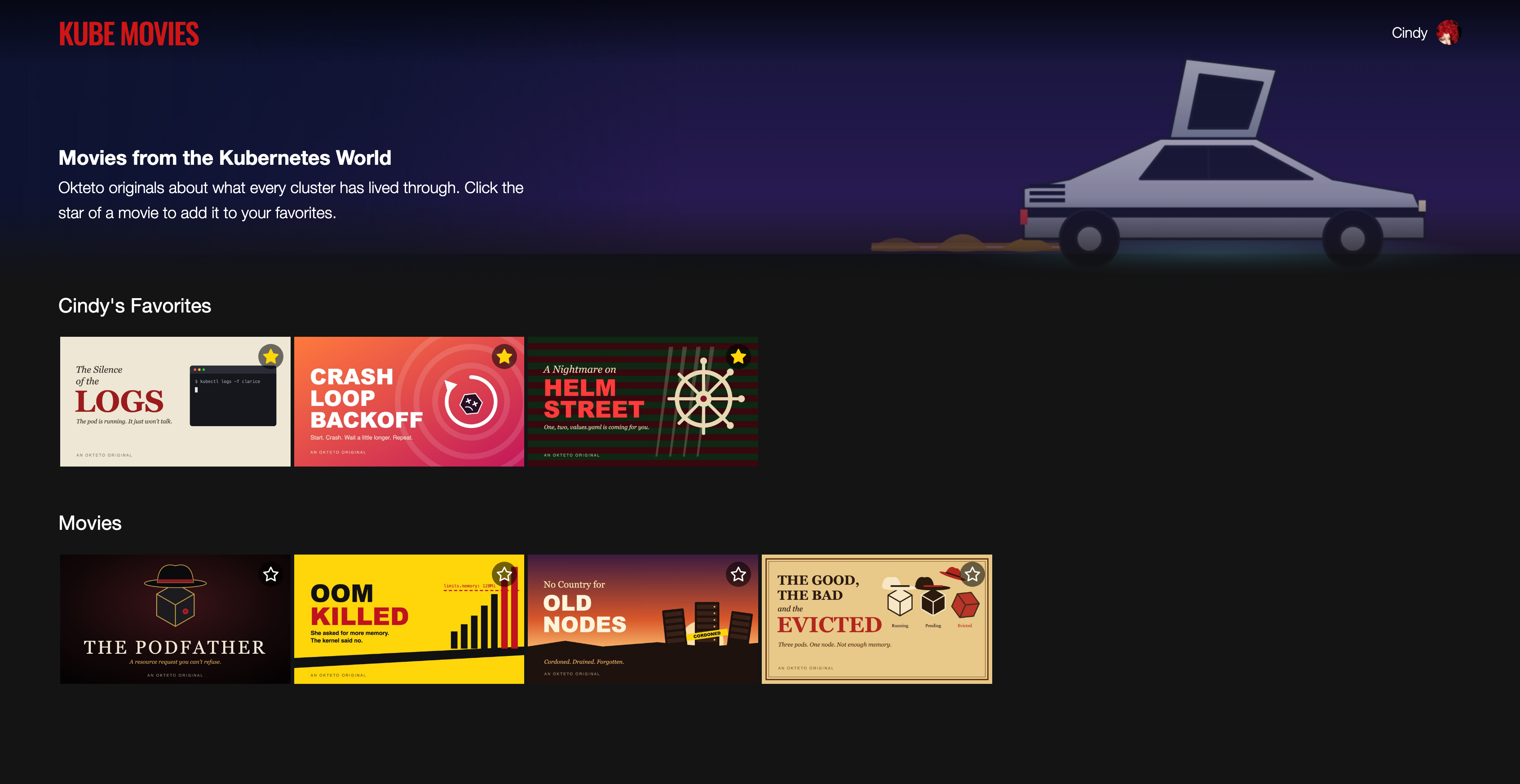
Open the URL in your browser and Kube Movies is there. Click the star of a movie to add it to your favorites:
Test
Your application is running, so you can test it the way your users use it: against the real services, not against mocks. The test section of the Okteto Manifest defines the automated tests. Kube Movies uses Playwright to open the application in a browser, compare the movies on the page with the ones stored in MongoDB, and move a movie to the favorites:
test:
  e2e:
    image: mcr.microsoft.com/playwright:v1.65.1-noble
    context: e2e
    caches:
      - /root/.npm
    commands:
      - bash run_tests.sh
    artifacts:
      - test-results
      - playwright-report
The test runs in the official Playwright image, in the same version of Playwright that e2e/package.json pins. Like the deploy command, it runs with Remote Execution, in a container inside your Namespace, where the application runs.
Run the tests with okteto test:
okteto test
 i  Using cindy @ okteto.example.com as context
 i  Executing test container 'e2e'
 i  Running 'bash run_tests.sh'
added 15 packages, and audited 16 packages in 1s
found 0 vulnerabilities
> e2e@1.0.0 test
> playwright test
Running 7 tests using 1 worker
  ✓  1 [chromium] › tests/content.spec.js:28:1 › displays the favorites section (429ms)
  ✓  2 [chromium] › tests/content.spec.js:36:1 › displays the movies section (415ms)
  ✓  3 [chromium] › tests/content.spec.js:44:1 › moves a movie to the favorites and back (322ms)
  ✓  4 [chromium] › tests/header.spec.js:3:1 › displays the header (138ms)
  ✓  5 [chromium] › tests/hero.spec.js:3:1 › displays the hero (139ms)
  ✓  6 [chromium] › tests/main.spec.js:3:1 › has title (126ms)
  ✓  7 [chromium] › tests/main.spec.js:10:1 › matches screenshot (254ms)
  7 passed (2.8s)
 ✓  Command 'bash run_tests.sh' successfully executed
 ✓  Test container 'e2e' passed
That's the loop for every round of changes:
- Run
okteto deployto update your application environment. - Run
okteto testto check it. - Open its URLs to try the change yourself.
The Okteto CLI is all you installed to get here. No Docker, no Node.js, no MongoDB, and no Playwright with its browsers: the builds, the deploy commands, and the tests all ran in your cluster. The loop is the same for a developer, a pull request, or a coding agent.
Destroy
When you're done, clean up. okteto destroy deletes the application environment: it uninstalls the Helm release of Kube Movies from your Namespace.
okteto destroy
 i  Using cindy @ okteto.example.com as context
 i  Images were already built. To rebuild your images run 'okteto build'
 i  Running 'helm uninstall movies'
release "movies" uninstalled
 ✓  Development environment 'getting-started' successfully destroyed
FAQ
How do I set up my own repository the same way?
Use a coding agent with the Okteto skills. Ask it to set up your repository for Okteto: it discovers your services, writes the Okteto Manifest, and validates it with okteto build and okteto deploy.
How do I develop with hot reload and a debugger?
Okteto supports hot reload and debuggers: okteto up runs a service of your application environment with your local changes as you save them. See the samples for each language: ASP.NET, Go, Java, Node.js, PHP, Python, Ruby, and Rust.
How do I make builds, deploys, and okteto up faster?
Upload only the files that each command needs: the context upload is key to performance. Every okteto build, okteto deploy, okteto test, and okteto up uploads files from your machine, and three ignore files decide what gets uploaded: .dockerignore for the image builds, .oktetoignore for okteto deploy, okteto test, and okteto destroy, and .stignore for File Sync. A coding agent with the Okteto skills configures them for your application and measures how much faster your builds, deploys, and okteto up get. Optimize Your Application Environment covers these and other optimizations.
Do I need to deploy the whole application in every Namespace?
No. Okteto supports two models, and you choose one for your application:
- Full replica: every service of the application runs in your Namespace. In a monorepo, the
deploysection of the Okteto Manifest deploys every service, as in this quickstart, where one Helm chart deploys the three services of Kube Movies. In a multirepo, each repository has its own Okteto Manifest and lists the other repositories in itsdependenciessection, as in Deploy a Multi-Repo Application with Dependencies. Full replicas are simpler to configure and give you full isolation: nothing one environment does affects the others. Use them for an application with fewer than 20 services. - Overlay Namespace: your Namespace runs only the services you change, and Divert routes every other request to a Shared Namespace that runs the rest of the application. Overlay Namespaces are more cost-effective, faster to deploy, and more reliable, because each environment builds, deploys, and runs only the services it changes. Use them for an application with 20 services or more.
How do I create a Preview Environment of my application for every pull request?
Add a workflow to your CI pipeline that deploys the application in a Preview Environment when a pull request opens or changes, runs okteto test against it, and destroys it when the pull request closes. The workflow uses the Okteto Manifest, so okteto build, okteto deploy, and okteto test work the same way in your CI pipeline, for coding agents, and on developer machines. Follow the guide for GitHub Actions or for GitLab CI/CD.
How do I start each environment with realistic data?
Load the data with a script in your deploy commands, as the seed job of Kube Movies does, or copy the data of another application environment with a Volume Snapshot, which creates the volumes of your database from a snapshot of its volumes. Data from Volume Snapshots shows how.
How do I create resources outside Kubernetes, such as a cloud database?
Create them in the deploy and destroy commands with your infrastructure as code tool, so every environment gets its own resources. See the Create Cloud Infrastructure with Terraform tutorial, which creates an Amazon S3 bucket for each environment.
Can I access my application environment with kubectl?
Yes. Run okteto kubeconfig to add the credentials of your Okteto Namespaces to your kubeconfig file, and use kubectl as usual: kubectl get pods, kubectl logs, or kubectl describe. See Kubernetes Credentials for how Okteto generates those credentials.